The second day in we started the blockout for the class diorama. I learnt a lot of new tools that I didn’t know before. Some of these tools could be really handy in future project. The main two that stuck out to me was the Quad draw. The quad draw tool looks really helpful when making organic shapes. We used the Quad Draw tool to make the land on the diorama. We also used the sculpt tool which helped make the bottom of the land look more rocky.

Another tool we learnt was the Three Point circular Arch tool. This tool is really nice when it comes to making smooth and round curves instead of manually doing them. We used this tool to make the archway That is above the door. Overall learning both of these tool gave me a different way to approach modelling objects.
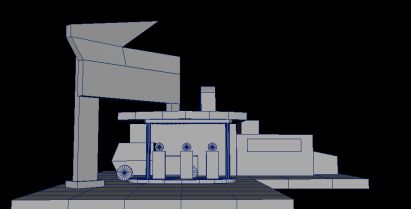
After lesson I started modelling my blockout for my gas station Diorama. So far I’ve made three different ones, just experimenting with the composition of things and how the viewer eyes will move through the scene. I still want to make a couple more just until i’m happy with the overall look of the scene.
 Shay Game Art